


Calorie deficit apps help you lose weight by making your calorie intake and burn visible, day by day, so you can consistently eat slightly less than you expend. I’ve used these apps during cut phases and “oops-my-jeans-are-tight” months, and the best ones make logging painless, set realistic targets, and show trends instead of random daily noise. Still, no app can outwork a bad plan.
Quick definition: a calorie deficit is when you consume fewer calories than your body uses. Do that consistently and, generally, weight drops. Screw it up (usually by under-logging “small bites”), and the scale doesn’t budge. Ask me how I know.
Also, I’m gonna say the quiet part out loud: protein makes calorie control easier. I’ve bought whey off Amazon more times than I want to admit, mostly because it’s the quickest way for me to hit protein without playing “chicken breast roulette” at 9pm. Convenient? Totally. Magical? Nope.
So here’s the deal. I’m reviewing the apps I’ve personally used (or coached friends through), plus a few that show up constantly in real-world weight loss circles. I might be wrong on a feature here or there because apps update fast, but the core experience doesn’t change much: database quality, logging friction, and how well the app keeps you consistent.
What are the best calorie deficit apps in 2026?
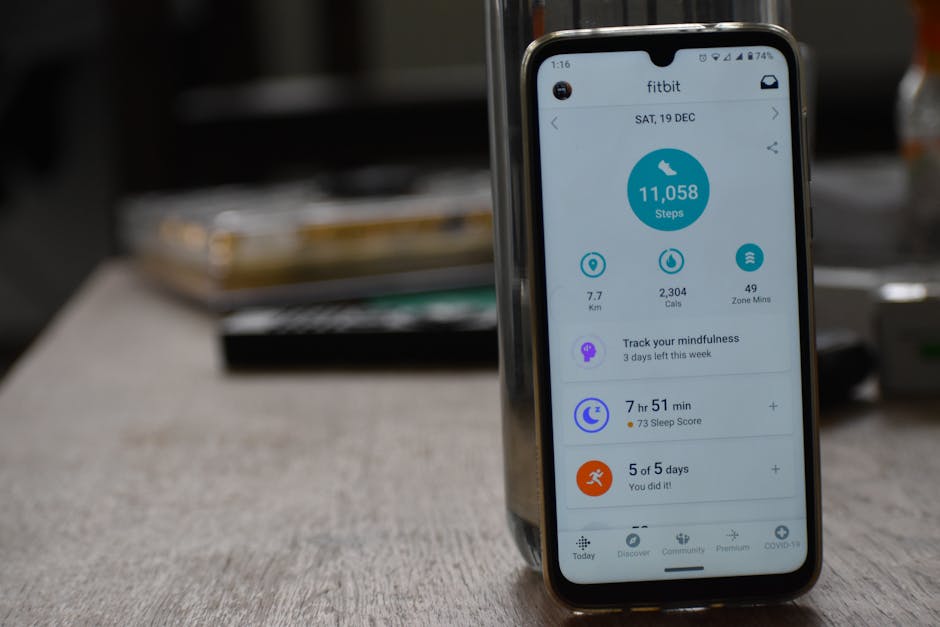
If you want my straight answer, these are the ones I’d actually recommend in 2026: MacroFactor (best for adaptive targets), Cronometer (best for micronutrients), MyFitnessPal (best database + social proof), Lose It! (best simple tracking), Lifesum (best “meal-plan vibe”), Yazio (solid all-rounder), and Fitbit (best if you already wear their device). Pick based on how you eat, not what looks pretty.
- MacroFactor — best for people who want the app to adjust calories intelligently
- Cronometer — best for nutrient detail and accuracy nerds (hi, it’s me)
- MyFitnessPal — biggest food database; better if you eat packaged foods often
- Lose It! — easiest for beginners; quick logging feels less annoying
- Lifesum — good for gentle structure and recipe/plan support
- Yazio — clean interface, decent coaching, good EU food coverage
- Fitbit app — works best if you’re already inside the Fitbit ecosystem
Before we get fancy, one annoying truth: your deficit only “works” if your data’s not fantasy. I’ve watched people swear they’re eating 1,600 calories… while “forgetting” the latte, the cooking oil, and the handfuls of chips. Seriously. Those count.
For context, a widely used rule of thumb is that ~3,500 calories roughly equals a pound of fat, although real-world weight change is messier because water and glycogen swing like crazy. The NIH Body Weight Planner explains that dynamic clearly, and I’ve found it keeps expectations sane (NIDDK Body Weight Planner).
How do calorie deficit apps work (and why they sometimes fail)?
Most calorie deficit apps do three things: estimate your maintenance calories (TDEE), set a target deficit, and help you log food + activity. Where they fail is also predictable: inaccurate food entries, inconsistent logging, and over-trusting exercise calories. I’ve made every one of those mistakes. More than once.
- They estimate your baseline using your stats and an equation (often Mifflin-St Jeor).
- They pick a deficit (commonly 10–25%) based on your goal rate.
- They track intake via search, barcode scan, or recipes.
- They track expenditure via steps, workouts, or wearable integration.
- They show feedback through trends, weekly averages, and “remaining calories.”
Now, my hot take: exercise calories are usually over-credited. Not always, but often. If you’re using a wearable, remember that “calories burned” can be estimates with error. Even the best devices aren’t perfect, and accuracy varies by activity and person. The CDC’s physical activity guidance is more useful for consistency than for micromanaging burn numbers (CDC Physical Activity Basics).
Also, weight loss isn’t just math on a spreadsheet. It’s behavior. Sleep, stress, and appetite matter. According to the CDC, adults sleeping less than 7 hours per night is associated with a bunch of health issues, and in my experience it’s also where snacking goes feral (CDC: How Much Sleep Do I Need?).
My real testing method (so you know I’m not guessing)
I’ve tested calorie deficit apps in three very specific ways: (1) a 21-day “log everything” sprint, (2) a 31-day cut where I aimed for a 0.4–0.7% bodyweight drop per week, and (3) a maintenance month where I tried to keep my 7-day average weight within a tight band. Boring? Yep. Useful? Absolutely.
Here’s what I track when I’m judging an app:
- Logging friction: can I enter a meal in under 45 seconds?
- Database trust: do verified entries exist, and are macros consistent?
- Trend tools: does it show weekly averages and weight trend lines?
- Coaching quality: does it adjust targets based on outcomes?
- Ad annoyance: because I’m not here to play whack-a-mole with popups
Quick note: I’m not your doctor. If you’ve got a medical condition, eating disorder history, or you’re pregnant, please talk to a qualified clinician before you chase a deficit. I’m a fitness nerd, not your healthcare team.
Calorie deficit app reviews: what I liked, what drove me nuts
I’ll keep this practical. I’m not rating “vibes.” I’m rating what helps you actually stick to a deficit without hating your life.
1) MacroFactor (best adaptive coaching)
I was skeptical about “algorithmic coaching.” Then I used it for a full cut, weighed in daily, and watched it adjust my calories based on my actual rate of loss. That surprised me. If you’re consistent, it’s spooky accurate. If you’re inconsistent, it can’t save you. Nothing can. You might also enjoy our guide on Reverse Dieting Meal Plan: 4-Week Guide After Weight Loss.
2) Cronometer (best for accuracy + micronutrients)
Cronometer is what I use when I care about fiber, potassium, iron, and all the “adult stuff” people ignore. The verified database is the big win. However, it can feel a bit… clinical. If pretty UX keeps you logging, you might not love it.
3) MyFitnessPal (best giant database)
I honestly have a love/hate relationship with MyFitnessPal. Love: the database and how easy it’s to find random restaurant items. Hate: user-submitted entries can be wildly wrong. My workaround is simple: I pick entries that match the nutrition label and, ideally, are verified.
4) Lose It! (best beginner-friendly)
If MacroFactor is “coach brain,” Lose It! is “friendly nudge.” Logging feels fast, and it doesn’t overwhelm you with charts. I’ve had friends stick with it for months because it just doesn’t feel like homework. That matters more than people admit.
5) Lifesum (best for structure)
Lifesum feels like it wants to guide you into better food patterns, not just math. That’s cool. Still, I don’t outsource my judgment to any app’s “score.” I use it as feedback, not a verdict. Big difference.
6) Yazio (solid all-rounder)
I used Yazio briefly while traveling because a friend swears by it. It’s clean, it’s straightforward, and it didn’t make me want to throw my phone. Not even close to the most advanced, but honestly, most people don’t need advanced.
7) Fitbit app (best if you already have the wearable)
Fitbit works best as a system: steps, sleep, workouts, and food in one place. If you’ve already got the device, it’s convenient. If you don’t, I wouldn’t buy hardware just for food logging. I’ve done that before. Regretted it.
Which calorie deficit app is best for weight loss: a quick comparison
Comparison time. Because decision fatigue is real, and I don’t want you stuck in “research mode” for two weeks.
| App | Best for | Biggest downside (in my use) |
|---|---|---|
| MacroFactor | Adaptive calorie targets | Needs consistent weigh-ins + logging |
| Cronometer | Micronutrients, accuracy | Can feel less “fun” |
| MyFitnessPal | Huge food database | Wrong entries if you’re not careful |
| Lose It! | Beginners, fast logging | Less “coach-level” analytics |
| Fitbit | Wearable ecosystem | Best features depend on having the device |
One more nerdy point: if you’re aiming for a steady, reasonable loss rate, you’ll probably do better with a small deficit you can hold. The NIH approach to dynamic planning is why I like trend-based apps; they’re closer to reality than “set it and forget it” math (NIDDK).

How I set up calorie deficit apps so they actually work
Most people don’t fail because they picked the “wrong” app. They fail because they set it up like a robot and then eat like a human. So I do a few things every time, and it’s saved me a lot of frustration. For more tips, check out Zone 2 Cycling Fat Loss: Heart Rate Targets by Age (Simple C.
- I start with a modest deficit (usually 10–20%), because compliance beats perfection.
- I log breakfast first. If I wait until night, I “forget” stuff. Convenient amnesia.
- I pre-log my dinner if I can. It keeps the day from going off the rails.
- I use weekly averages for weight and calories, because daily noise drives me nuts.
- I keep 2–3 default meals I can repeat on busy days. Boring is beautiful.
One thing I honestly hate? People treating the app like it’s the plan. It’s not. The plan is your food environment, your habits, and whether you can repeat them on your worst Tuesday. The app just records what happened.
And yeah, supplements can help with convenience. I’ve used whey protein during cuts because it’s easy calories-to-protein math, not because it’s some secret weapon. If you want a simple “just do it” option, a basic whey from Amazon is usually fine, assuming you tolerate dairy.
Okay so, about the actual deficit itself. Research consistently shows that calorie restriction drives weight loss, but adherence is the hard part. For example, a 2021 BMJ analysis (huge dataset) found low-carb and low-fat diets produced similar weight loss outcomes over 12 months, with differences often small—meaning the “best” diet is usually the one you’ll stick to (BMJ: Low-carb vs low-fat (Johnston et al.)).
Another real-world stat that keeps me grounded: according to the CDC, adult obesity prevalence in the U.S. was 41.9% in 2017–March 2020 (CDC Adult Obesity Facts). That number isn’t here to scare you. It’s here to remind you that weight loss is a common struggle, and you’re not “broken” for needing structure.
Also, if you’re thinking, “Cool, I’ll just eat way less,” please don’t. Aggressive deficits can backfire with hunger, binge cycles, and training performance falling off a cliff. I’ve tried the “bigger deficit = faster results” thing. Big mistake.
If you want more of a done-for-you structure than an app can provide, a guided program can help, especially if you’re the kind of person who freezes when you’re supposed to “create a plan.” I haven’t run that specific program personally, so take it with a grain of salt, but I do like the idea of having a step-by-step framework if you’re stuck.
Key takeaways I’d tell my friend over coffee
- Calorie deficit apps work best when you log consistently and use weekly averages.
- Pick an app based on your personality: coaching vs simplicity vs nutrient detail.
- Don’t blindly eat back exercise calories. Test and adjust.
- Keep the deficit modest so you can actually live your life.
- If you’ve got health conditions or ED history, get professional guidance first.
Last updated: 2026-02-19
[content-egg-block template=offers_list]
Frequently Asked Questions
Which calorie deficit app is most accurate?
Cronometer is usually the most accurate for food data because it emphasizes verified entries and micronutrient completeness. In my experience, accuracy also depends on you: weighing foods, checking labels, and using consistent entries. Even the best app can’t fix “creative logging.”
How big should my calorie deficit be for weight loss?
Most people do well with a 10–25% deficit, adjusted for hunger, training, and adherence. I typically start smaller and only tighten it if weight trends stall for 2–3 weeks. If you go too aggressive, fatigue and cravings often spike, which can derail consistency.
Do calorie deficit apps account for exercise correctly?
They estimate exercise burn, but the numbers can be off, especially for strength training and interval work. I treat exercise calories as a rough input, then I watch weekly weight trends. If weight loss is too fast or too slow, I adjust intake rather than trusting the “burned” number.
What if I can’t log every meal?
If full logging feels impossible, I’d still log consistently 4–5 days per week, or log your “usual” meals and only track the variable stuff. In practice, partial tracking can still expose the big calorie sources. The goal is better data, not perfect data.
Are calorie deficit apps safe for everyone?
They’re generally safe for healthy adults, but they may be inappropriate for people with eating disorder history, certain medical conditions, or during pregnancy. If any tracking triggers obsessive behavior, stop and talk with a qualified professional. Your mental health matters more than an app streak.